
Every developer who has wrestled with a Large Language Model (LLM) knows the familiar cycle of hope and frustration. You get a brilliant, insightful answer to your first question. You ask a follow-up, and the model gives you a blank stare, having completely forgotten the context of your conversation.
This is the infamous “goldfish memory” problem. To overcome it, we resort to a clumsy hack: we bundle the entire conversation history and send it with every single new message. This constant re-explaining isn’t just inefficient and costly; it’s a red flag signaling a deeper architectural flaw in how we build AI applications.
What if our AI didn’t have to be a forgetful genius? What if it had an indispensable partner—a trusted aide to manage its memory, handle its logistics, and prepare it for every interaction? What if our AI had a Chief of Staff?
This is the essence of the Model Context Protocol (MCP), an architectural pattern that provides the crucial support system to elevate our AI from a simple tool into a coherent and reliable application.
So, What is an MCP Server?
Let’s ground this in a human concept. Imagine your LLM is a brilliant, visionary CEO. This CEO can solve incredibly complex problems but has zero short-term memory and can only focus on the single document placed directly in front of them.
An MCP Server is this CEO’s Chief of Staff.
- It Manages the Calendar: When a new user (a “stakeholder”) starts a conversation, the Chief of Staff opens a new file for them, creating a unique session_id.
- It Takes Meticulous Notes: Every word exchanged between the stakeholder and the CEO is recorded in that file. This is the conversation history.
- It Prepares the Briefing: Before the CEO answers a new question, the Chief of Staff slides the complete file across the desk, providing the full history and context. “Here’s everything you’ve discussed with them so far.”
- It Handles Logistics: If the CEO needs data from another department (like a database or an external API), they don’t do it themselves. They ask the Chief of Staff, who goes and retrieves the information securely.
The Chief of Staff (the MCP Server) orchestrates the entire flow of information, allowing the brilliant CEO (the LLM) to apply its intelligence with the full picture in mind.
The Architectural Blueprint: A Clean Separation of Duties
The beauty of this architecture lies in its clean separation of responsibilities, which keeps each component simple and focused.
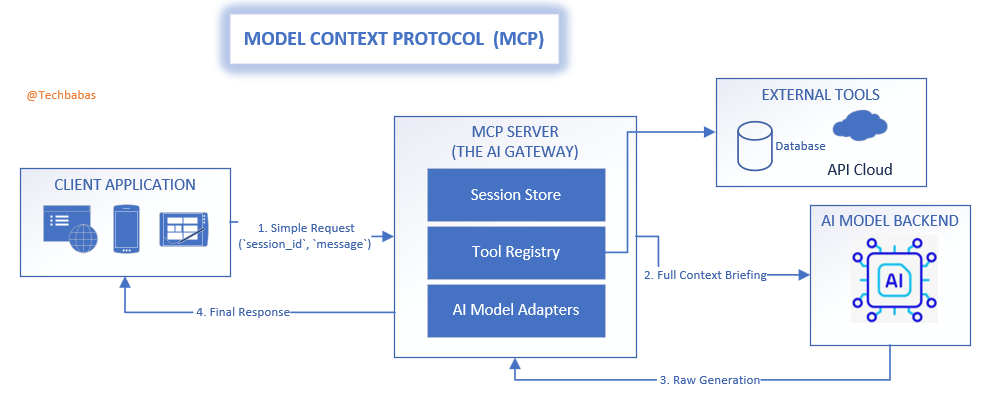
- The Client Application: Your user-facing app. It has a simple job: communicate with the Chief of Staff, holding onto its unique session_id and sending new messages as they come.
- The MCP Server (The Chief of Staff): The strategic heart of the operation. It manages all session files, talks to other “departments” (tools and APIs), and prepares the final briefing for the CEO.
- The AI Model Backend (The CEO): The core intelligence. It receives perfectly prepared context from its Chief of Staff and focuses solely on generating the best possible response.
This creates a smooth, efficient data flow. The client sends a small, lightweight request. The MCP server does the heavy lifting of assembling context and calling tools. The AI model receives a pristine, complete prompt. The client gets back a concise, relevant answer.
MCP: A Universal Standard in a Fragmented AI World
Right now, the world of AI integration feels like the Wild West. OpenAI has its specific JSON format for tools. Anthropic uses an XML-based approach. Open-source models need carefully crafted prompt templates. Building an application that can navigate this landscape is brittle and complex.
The MCP pattern introduces a desperately needed diplomatic layer—a universal standard that sits above the chaos.
- Break Free from Vendor Lock-in: Your client application speaks one simple, consistent protocol to the MCP server. The server, in turn, acts as a universal translator. It knows how to speak “OpenAI,” “Anthropic,” and “Llama.” If you decide to switch your backend LLM, you only update the translator module in your MCP server. Your client applications don’t change by a single line of code.
- A Universal Language for Tools: Instead of defining tools in a vendor-specific format, you create a simple, internal definition. The MCP server’s “Tool Registry” handles the complex task of translating this definition into the unique format each LLM requires.
- A Future-Proof Foundation: When the next groundbreaking model is released with its own quirky API, you simply write a new translator for your MCP server. Your entire ecosystem of applications instantly gains access to the new technology without a painful, widespread migration.
Example: The Universal Translator in Action
Let’s see how the MCP server provides a standard way to use a weather tool, shielding the application from backend complexity.
The client sends a simple, standard request—its only responsibility:
{
"session_id": "user-session-456",
"message": "What's the weather like in London?"
}
The MCP server now performs its translation magic. It knows which LLM is on duty and prepares the tool information accordingly.
# Inside the MCP Server (mcp_gateway.py)

# A standard, internal blueprint for our tool
TOOL_GET_WEATHER = {
    "name": "get_weather",
    "description": "Get the current weather for a specific city.",
    "parameters": {
        "type": "object",
        "properties": {"city": {"type": "string", "description": "The city name."}},
        "required": ["city"],
    },
}

def get_briefing_for_backend(tools, backend_name="openai"):
    """
    Translates our internal tool blueprints into the specific 'language'
    of the target LLM. This is the core of the adapter pattern.
    """
    if backend_name == "openai":
        print("Preparing the tool briefing for the OpenAI CEO...")
        # OpenAI's CEO likes their briefings in a specific JSON format.
        return [{"type": "function", "function": tools[0]}]

    elif backend_name == "anthropic":
        print("Preparing the tool briefing for the Anthropic CEO...")
        # Anthropic's CEO prefers briefings in an XML memo format.
        return f"<tools><tool_description>...</tool_description></tools>" # Simplified for clarity

    else:
        # Some open-source CEOs prefer a simple note in their briefing.
        return f"P.S. You can use this tool: {tools[0]['name']}(city)."

# Let's assume our config says `AI_BACKEND = "openai"`
backend_specific_briefing = get_briefing_for_backend([TOOL_GET_WEATHER], backend_name="openai")

# The MCP server now sends this perfectly formatted briefing to the OpenAI API.
# The client has no idea this translation even happened.
The Full Picture: Your AI Gateway
When you fully embrace this pattern, your MCP server becomes more than just a Chief of Staff—it becomes a comprehensive AI Gateway, a fortified front door for all AI interactions.
- A Fort Knox for Your Tools and Secrets: All sensitive operations, like database queries or paid API calls, are performed on the server. All your secret keys are stored securely, never exposed to the client.
- The Central Security Desk: Enforce authentication, manage user permissions, and implement rate limiting to protect your application and your budget, all in one place.
- A Real-Time Communication Hub: Handle modern protocols like Server-Sent Events (SSE) to stream the AI’s response token-by-token, creating the fluid, “live typing” experience that users expect.
Let’s Build It: A Practical Python AI Gateway
Theory is great, but code makes it real. Here’s a minimal MCP server using FastAPI that acts as a Chief of Staff for our AI.
# mcp_gateway.py
import uuid
import time
from fastapi import FastAPI, HTTPException
from pydantic import BaseModel
import datetime

# --- Pydantic Models for clear data contracts ---
class ChatRequest(BaseModel):
    session_id: str
    message: str

class SessionResponse(BaseModel):
    session_id: str

class ChatResponse(BaseModel):
    response: str

# --- Initialize FastAPI App ---
app = FastAPI(title="AI Gateway: The AI's Chief of Staff")
sessions = {} # Use Redis/DB in production for the session files

# --- The Chief of Staff's Tool Rolodex ---
def get_current_time(**kwargs):
    """A tool to get the current server time."""
    return f"The current time is {datetime.datetime.now().isoformat()}."
tool_registry = {"get_current_time": get_current_time}

# --- Simulating the interaction with the CEO (LLM) ---
def consult_with_ceo(history: list[dict]) -> str:
    """The Chief of Staff briefs the CEO and gets a decision."""
    print(f"--- Preparing briefing for CEO ---\n{history}\n---------------------------")
    user_message = history[-1]['content'].lower()

    # The CEO sees the word "time" and asks the CoS to handle it
    if "time" in user_message:
        print("CEO requested data; CoS is executing 'get_current_time' tool.")
        tool_result = tool_registry["get_current_time"]()
        # The CoS formats the data for the final response
        final_response = f"I've just checked. {tool_result}"
        return final_response
    else:
        # A standard conversational response
        return f"Understood. We've exchanged {len(history)} messages. Your last point was: '{history[-1]['content']}'"

# --- API Endpoints for the outside world ---
@app.post("/start_session", response_model=SessionResponse)
def start_session():
    """Opens a new case file for a stakeholder."""
    session_id = str(uuid.uuid4())
    sessions[session_id] = []
    print(f"New session file created: {session_id}")
    return {"session_id": session_id}

@app.post("/chat", response_model=ChatResponse)
def chat(request: ChatRequest):
    """Handles an interaction, preparing the brief and updating the file."""
    if request.session_id not in sessions:
        raise HTTPException(status_code=404, detail="Session file not found.")

    # 1. Update the case file with the new message
    history = sessions[request.session_id]
    history.append({"role": "user", "content": request.message})

    # 2. Consult with the CEO, providing the full briefing
    ceo_response = consult_with_ceo(history)

    # 3. Record the CEO's response in the file
    history.append({"role": "assistant", "content": ceo_response})
    sessions[request.session_id] = history

    # 4. Relay the final response to the stakeholder
    return {"response": ceo_response}

# To run: uvicorn mcp_gateway:app --reload
The client code that interacts with this sophisticated gateway remains incredibly simple, focused only on the user experience.
Conclusion: It’s Time to Build Systems, Not Just Prompts
The Model Context Protocol isn’t just a technical pattern; it’s a strategic philosophy for building mature AI applications. It calls on us to move past simple, fragile scripts and start architecting intelligent systems that are robust, secure, and adaptable.
By giving your AI a Chief of Staff, you provide the essential support structure it needs to function effectively. You create a system that is prepared for the future—ready for new models, new tools, and new challenges. You stop building forgetful chatbots and start creating reliable AI partners.